HP Data Protector focus day. If you can spend some time in Germany in October this year, you might wont miss the HP Data Protector focus day. For more information visit the HP site: http://h41267.www4.hp.com/eventpage.aspx?eventid=NAAxADEAMAA3AA%3d%3d&cc=de&lang=de
Author Archives: danielbraun
Data Protector and SLES 11 SP2
Since the latest patches for Data Protector (621, 701) the kernel version 3 for Linux is supported to install a new client using installation server. In general there shouldn’t be a problem during the installation, however when you receive following error message (i.e. for OpenSuse or SLES 11 SP2): Unsupported architecture/OS type (Linux CLIENT 3.1.9-1.4-desktop #1 SMP PREEMT …) Skipping Client!, you have 3 options to handle on – 2 workarounds, 1 solution. Workaround 1: do a local installation of core.rpm and da.rpm on the client (packages can be extracted from installation server). Workaround 2: copy the file /etc/os-release to /etc/novell-release on the client in question and start the push installation using GUI. The solution will be the installation of a hotfix (the QCCR number I post as soon I have the fix received).
BRICK – Backup Related Information Collector and Keeper
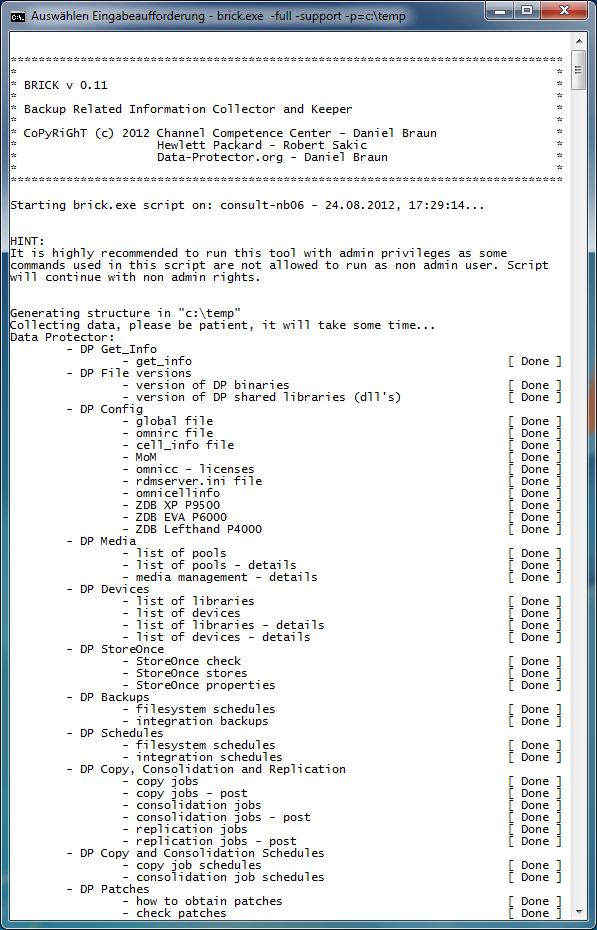
BRICK – A new tool for Data Protector!!! Interested? Continue to read here:https://www.data-protector.org/wordpress/brick/.
Update 2012/08/21: new version (v0.11) released, for more information please refer to the ChangeLog, a lot of enhancements were done. Please use link above.
Please see screenshot below.
Please comment on page: https://www.data-protector.org/wordpress/brick/.
Enhanced Help: The help system was enhanced too.
*******************************************************************************
*                                                                             *
* BRICK v 0.11                                                                *
*                                                                             *
* Backup Related Information Collector and Keeper                             *
*                                                                             *
* CoPyRiGhT (c) 2012 Data-Protector.org - Daniel Braun                        *
*                                                                             *
*******************************************************************************
BRICK - Backup Related Information Collector and Keeper
Usage: brick < -full|-reduced|-long> -p=< path for output >
       [-support] [-fixed] [-log]

REQUIRED:
  -full                 runs all checks - recommend for maximum 75 server
                        in cell / environment (includes full DNS check and
                        check of the internal database, reports for last
                        7 days, ...)
  or
  -reduced              runs reduced checks - recommended for larger cell /
                        environments (short DNS check, no check of the
                        internal database, reports for last 2 days, ...)
  or
  -long                 runs additional IDB checks - not recommended
                        for larger cell / environments as runtime of script
                        will increase. Use this mode in smaller
                        environments or when request by support.

  -p,  --path           "path to write output", example: -p=c:\temp
                        Use " to quote directories with spaces, example:
                        -p="C:\Documents and Settings\User\temp"

OPTIONS:
  -support              will collect additional files for support and
                        generates a special html site for support with most
                        asked questions
  -fixed                reuse existing path for output, content is not
                        deleted before execution, so be careful
  -v,  --version        display the version of script and exit
  -h,  --help           print this help.


Please see generated changelog for additional information.
It is recommended to run the script as administrator / in admin mode.
Please keep in mind that WMI must be installed to run the script.

EXAMPLES:
- To collect data as report:
  brick.exe -full -p=c:\temp\brick
  brick.exe -reduced -p=c:\temp\brick
  brick.exe -long -p=c:\temp\brick
- To collect data as report and include files:
  brick.exe -full -support -p=c:\temp\brick
  brick.exe -reduced -support -p=c:\temp\brick
  brick.exe -long -support -p=c:\temp\brick

Mail bug reports and suggestions to daniel-braun(at)data-protector.org.


Return codes:
 0 - OK, no errors in script
-------------------------------------------------------------------------------
 1 - end of script after displaying help (option -h used)
 2 - end of script after displaying version (option -v used)
 3 - end of script after displaying params - error missing required parameter
10 - script was not started on cell server
11 - unable to create or open bricklog.html
12 - the output path cannot be the root directory of the drive
13 - unable to create homedir for BRICK
14 - unable to create a required folder for the BRICK report
-------------------------------------------------------------------------------
99 - unspecfied error - line number in script is displayed
OMNISPEED – average speed of sessions
Update 2012.07.24: Sometimes it can take longer than expected… however the new version has been finished. All language settings were tested (I got a lot of feedback, thanks. To get a list of supported languages use -language – see help). In addition in the new version historical data / sessions are displayed (Example -session=2012/07/24-2). The version number has been changed to A 00.01.04. There will only one Version for both platforms – 32Bit and 64Bit. The new version can be found below.
[wpdm_file id=2]
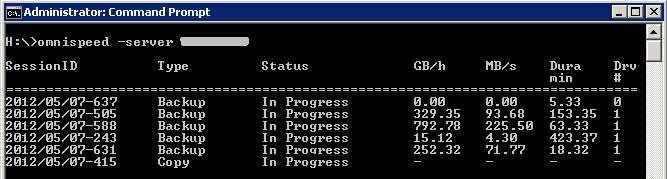
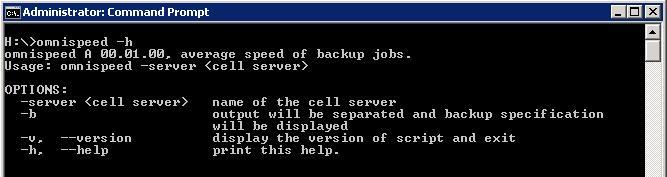
To calculate the speed of your backup jobs is not a easy task within Data Protector, you need to monitor the session, to write down the start time, to write down the GB written and finally to calculate the speed. So, here are the good news, this work I automated for you. Please donwload the new tool omnispeed from link below, it allows you to monitor the backup performance online without any manual work – please see screenshots. To install the tool extract the version (x86 or x64) into the bin folder in omniback on your cell server and execute it, thats it. If you are not running on Windows, please have a look at help screen. Please keep in mind: the values displayed are the total throughput for the currently running sessions, troughput for one session (current and total) will be displayed in next version.
[wpdm_file id=3]
For this version only backup jobs are listed, the monitoring of restore, copy and consolidation jobs is postponed to further version. In next version and with a given session ID as option there will be a switch to display the performance for the job to be refreshed per 5 seconds. This will include total and current throughput. Also in next version you can expect the results from closed sessions and for single objects. On systems running locale set to with French, Japanese, Chinese or Arabic locale the software is not supported and will not run (If you help me translating I can make it work). For non german and non english systems, please read help to get localized version.
Update 2012.05.08: Added danish and bulgarian locale, the GB/h is an average, modified the code to display the word average in help and in the output. Added a comment that if option -server is not used localhost is assumed. Version of tool changed to A 00.01.01
I look forward to further suggestions and hope you will enjoy the tool.
DPcfgCreator
DPcfgCreator – An additional tool for Data Protector!!! This time written by Stephan Voss, he wanted to ease the modification of the Data Protector config files. For more details please refer to his site at http://hpux.de/?s=dpcfgcreator.