With the previous article https://www.data-protector.org/wordpress/2013/09/updated-support-matrices-data-protector-8-00/ I informed you that the support matrix for DP 8.0 has been changed and now supports Windows 2012 as Cell Server. To be able to run DP 8.0 on Windows 2012 you need the international release of DP, which has been released today. The version is avalaible here – http://www.hp.com/go/dataprotector
Updated support matrices for Data Protector 8.00
Update: The support matrices for Data Protector 8.00 were updated on 09/19/2013. Microsoft Windows Server 2012 as Cell Server is back on the support matrix.
The support matrices for Data Protector 8.00 were updated on 07/16/2013. Because of problems with the internal database (PostgreSQL) for some customers when using Microsoft Windows Server 2012 as the Cell Server the support for Windows 2012 as a cell server has been temporarily suspended and removed from the matrix “DP8.00_SupportMatrix_Platform_Integration.pdf”. It is assumed that the first patches for Data Protector 8.00 will correct the problems and support becomes available again.
Your HELP is appreciated
Your HELP is appreciated.
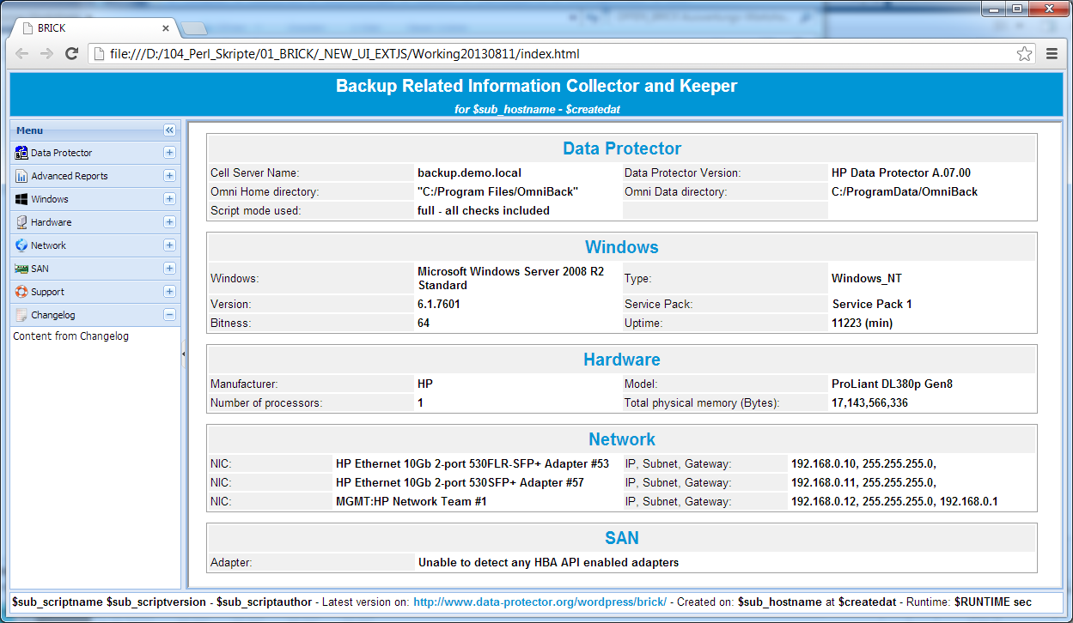
STATUS: Target achieved! Thanks to all donors for the awesome support!!! Please find below a screenshot how the new version will look like when using the browser Google Chrome.
STATUS: so far we have raised € [therm_r] towards our € [therm_t] target! Thank you for your support!
For the upcoming version of BRICK (see link) it is planned to support different browsers versions, instead of Microsoft Internet Explorer only. To get this implemented a different, professional Java framework will be used. To continue to offer the tool BRICK for free, I need YOUR support. For the development and dissemination of through BRICK generated HTML files and the generated reports I plan to use the Sencha Ext JS framework. The cost is approximately € 550.00 and I ask you on this path with a small donation (see donation link on the right) to assist me in the development of the future version 1.1, which will also provide support for Linux. Each supporter will mentioned by name and company name, for donations from 100,00 € the company logo is displayed too. In case a donor wishes to remain anonymous, this can be noted in the comments box at PayPal.
List of doners: Christian van Haut (Avnet – Germany), Jean Mesquida (France), Lars Mathwig (Liebherr – Germany), Patrick Terlisten (www.blazilla.de), Stephan Voss (www.hpux.de), anonymous donor (Germany), Bernhard Stöppler (Bechtle Frankfurt – Germany), Michael Schade (Bechtle – Germany), Norbert Langeder (Greiner Holding AG – www.greiner.at – Austria), Patrick Frømming (Danmark), Wolfgang Bauhammer (BIT Bauhammer Informationstechnik – Germany), , Thomas Laake (Charité CFM Facility Management – Germany)
Premium Donors: 
Virtual Environment Backups (VMware) to StoreOnce aborting randomly
When backing up virtual machines using the Virtual Environment Integration (VE) to a Catalyst Gateway (StoreOnce), with Data Protector 7.01 (current patches) the VEPA backups might aborting randomly. The error message displayed:
[Major] From: BSM@server.demo.local "VE_Backup_VMware"  Time: 15/07/2013 10:03:03
[61:3003]      Lost connection to BMA named "StoreOnce_01_GW1 [GW 2296:4:26641437476]"
        on host server.demo.local.
        Ipc subsystem reports: "IPC Read Error
        System error: [10054] Connection reset by peer
To fix the problem the omnirc parameter OB2D2D_BANDWIDTH_BUFF_SIZE=20 can be used on the Media Agent. The value for parameter is set to 10 by default in Data Protector 7.01, when using the value 20, the problem is not seen. In Data Protector 8.00 the problem is not seen, as the default value is already set to 20.
Advisory c03823106
With document ID c03823106 on 2013/07/10 an advisory for HP Data Protector 6.21, 7.01, 8.00 was released, describing a problem when VSS is used for the backups. In some cases it could happen, that the VSS snapshot is corrupted and Data Protector backed up the corrupted snapshot.
As the root cause is the VSS framework from Microsoft, the fix to solve the problem is delivered by Microsoft – http://support.microsoft.com/kb/2748349. Windows 7 SP1 and Windows 2008 R2 SP1 already contain this fix.
The complete advisory can be read here: http://h20565.www2.hp.com/portal/site/hpsc/template.PAGE/public/kb/docDisplay/?spf_p.tpst=kbDocDisplay&spf_p.prp_kbDocDisplay=wsrp-navigationalState%3DdocId%253Demr_na-c03823106-1%257CdocLocale%253D%257CcalledBy%253D&javax.portlet.begCacheTok=com.vignette.cachetoken&javax.portlet.endCacheTok=com.vignette.cachetoken